Deleting your Facebook account is a simple process, but it's important to understand that this action is permanent and cannot be undone. If you're sure you want to proceed, start by logging into your account and visiting the Facebook Help Center. From there, follow the step-by-step instructions to request account deletion. Keep in mind that it may take up to 90 days for your account to be fully deleted from Facebook's servers.

Steps to Permanently Delete Your Facebook Account
If you're thinking about permanently deleting your Facebook account, there are a few things you should know first. Deleting your account is a permanent decision that can't be undone, so make sure you're absolutely certain before taking this step. Here are the steps you need to follow to permanently delete your Facebook account:
- Back up your Facebook data: Before you delete your account, you'll want to make sure you have copies of any important information you've posted to Facebook, such as photos, videos, and messages. You can download a copy of your Facebook data by going to Settings > Your Facebook Information > Download Your Information.
- Deactivate your account: This step isn't necessary, but if you're not quite ready to permanently delete your account, you can deactivate it instead. Deactivating your account will make your profile and all your posts invisible to other users, but you'll still be able to reactivate your account if you change your mind. To deactivate your account, go to Settings > Your Facebook Information > Deactivation and Deletion.
- Delete your account: To permanently delete your Facebook account, go to this page and follow the prompts. You'll need to enter your password and complete a security check to confirm your identity. Once you've confirmed that you want to delete your account, Facebook will give you a grace period of 30 days before permanently deleting your data. If you log back into your account during this time, your deletion request will be cancelled.
- Confirm your deletion: After 30 days, your Facebook account will be permanently deleted and there's no way to get it back. Before your account is deleted, make sure you've copied any important data and that you're absolutely sure you want to go through with it. Once you've confirmed your deletion, your account and all your data will be permanently gone.
Things to Keep in Mind:
- Permanently deleting your Facebook account means you'll lose access to all your data, including messages, posts, and photos.
- You won't be able to use Facebook Messenger or any other Facebook apps associated with your account after it's been deleted.
- Your account may not be deleted immediately after you make the request. Facebook gives you a 30-day grace period to change your mind before your data is permanently deleted.
- If you log back into your account during the 30-day grace period, your deletion request will be cancelled.
- Once your account is deleted, there's no way to get it back. Make sure you've backed up any important data before you delete your account.
Deleting your Facebook account is a big decision that shouldn't be taken lightly. Make sure you've backed up any important data and that you're absolutely sure you want to go through with it before following the steps outlined above. Remember, once your account is deleted, there's no way to get it back.
What Happens When You Delete Your Facebook Account
If you have decided to leave Facebook permanently and delete your account, there are some things you should know about what happens when you do so. Here's a guide to help you understand what deleting your Facebook account means and what to expect.
What Happens When You Delete Your Facebook Account?
Deleting your Facebook account means that your profile, photos, posts, videos, and everything else associated with it will be permanently deleted. This includes your messages, comments, likes, and any other data you have shared on Facebook. Once you delete your account, you won't be able to retrieve any of this information.
How to Delete Your Facebook Account
If you have decided to delete your Facebook account, follow these steps:
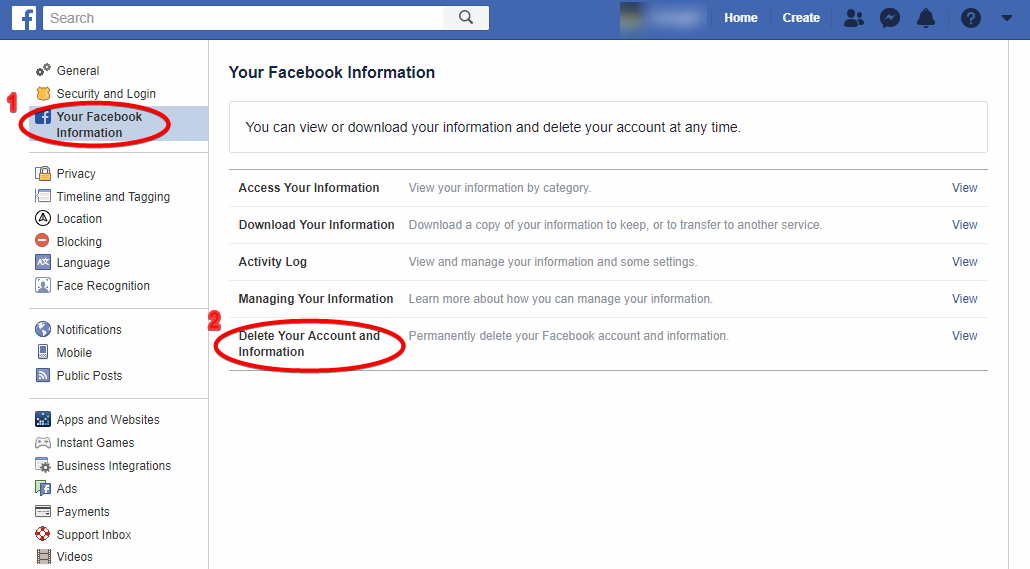
- Go to the "Settings" menu on Facebook.
- Click on "Your Facebook Information."
- Select "Delete Your Account and Information."
- Follow the prompts to confirm that you want to delete your account.
What Happens After You Delete Your Facebook Account?
Once you delete your Facebook account, Facebook will take some time to process your request. During that time, your account will be deactivated but not deleted. If you log back in during this time, your account will be reactivated, and you can cancel your deletion request. After the processing period is over, your account and all the information associated with it, including your photos, posts, videos, and messages, will be permanently deleted. You won't be able to access any of this information again.
What Happens to Your Data?
When you delete your Facebook account, Facebook will remove your data from its servers. However, it's important to note that some of your information may still be visible to others on Facebook, such as messages you sent to friends. Your activity logs may also still be visible to Facebook, but they won't be tied to your personal account information. Deleting your Facebook account is a permanent action, and it's important to understand what happens when you do it. Make sure that you have saved any information that you want to keep, such as photos and messages, before you delete your account. If you're sure you want to delete your account, follow the steps outlined in this guide, and remember that it may take some time for Facebook to process your request.
Alternatives to Using Facebook
Facebook has been on the forefront of social media platforms for years, but it's not for everyone. Some people are looking for alternatives to Facebook for various reasons, including privacy concerns, excessive distractions, or just to try something new. Fortunately, there are many other social media platforms available, each with their unique features and benefits. In this section, we'll explore some of the best alternatives to Facebook.
1. Twitter
Twitter is a powerful social media platform that allows users to post short messages or "tweets" in real-time. Twitter is known for its fast-paced and dynamic nature, making it an excellent alternative to Facebook for people looking for a more bite-sized social media experience. Twitter is particularly popular among journalists, politicians, and celebrities, making it an excellent source for breaking news and current events.
2. Instagram
Instagram is a photo and video-sharing app that has quickly become one of the most popular social media platforms. Instagram allows users to share photos, videos, and stories, providing a more visual and creative social media experience. Instagram is an excellent alternative to Facebook for people looking for a more curated and aesthetically pleasing social media experience.
3. LinkedIn
LinkedIn is a professional networking site designed to connect professionals and businesses. LinkedIn is an excellent alternative to Facebook for people looking to expand their professional network, find new job opportunities, or showcase their skills and expertise. LinkedIn also provides a more private and secure social media experience, making it a great choice for people concerned about privacy and security.
4. Reddit
Reddit is a social news and discussion website that allows users to submit content, vote on it, and engage in discussions around it. Reddit is known for its diverse and vibrant communities, providing a more niche social media experience. Reddit is an excellent alternative to Facebook for people looking to explore their interests and discover new topics and ideas.
5. Snapchat
Snapchat is a messaging app that allows users to send short-lived photos and videos to their friends. Snapchat is known for its fun and playful nature, making it an excellent alternative to Facebook for people looking for a more casual and lighthearted social media experience. Snapchat also provides more privacy and control over who sees your content, making it a great choice for people concerned about privacy.
There are many alternatives to Facebook for people looking for a different social media experience. Each platform has its unique features and benefits, and it's essential to choose the one that fits your needs and preferences. Whether you're looking for a more visual and creative experience like Instagram or a more professional and secure experience like LinkedIn, there's a social media platform out there for everyone.
How to Download Your Facebook Data Before Deleting Your Account
When you decide it's time to leave Facebook behind, it's important to remember to download your data before you say goodbye. This can include years of photos, messages, and other important information you've shared on the platform. Fortunately, Facebook makes it easy for you to download your data so you can keep it for your own records. Here's how to do it:
Step 1: Go to Facebook's Download Your Information Page
The first thing you need to do is navigate to Facebook's "Download Your Information" page. To get there, log in to your Facebook account and click on the "down arrow" in the top right corner of the screen. From the dropdown menu, select "Settings & Privacy" and then click on "Settings".
Step 2: Select "Download Your Information"
Once you're on the "Settings" page, scroll down until you see "Your Facebook Information" on the left-hand side of the screen. Click on it, and then select "Download Your Information".
Step 3: Choose What You Want to Download
When you're on the "Download Your Information" page, you'll see a list of options for what you can download. This can include everything from your photos and videos to your messages and posts. You can also choose the format you want to download your data in, as well as the quality.
Step 4: Start the Download
Once you've chosen what you want to download, click on "Create File". Facebook will then start preparing your data for download, which can take some time depending on how much data you have on the platform. You'll receive an email from Facebook when your data is ready to download.
Step 5: Download Your Data
When you receive the email from Facebook, click on the link provided. This will take you back to Facebook's "Download Your Information" page, where you can download your data. Simply click on "Download" and your data will be saved to your computer. While it can be difficult to say goodbye to Facebook, downloading your data before you delete your account is an important step to take. By following the simple steps outlined above, you can ensure that you keep all of your important information for your own records. Remember to take the time to download your data before you say farewell to the platform.
Reasons to Delete Your Facebook Account
Facebook has been a popular social media platform for years, but there are many reasons why people may choose to delete their account. Here are some of the most common reasons:
1. Privacy Concerns
One of the main reasons people choose to delete their Facebook account is because of privacy concerns. Facebook has been embroiled in numerous scandals over the years involving the mishandling of user data. Users are often unsure about what Facebook is doing with their data and who has access to it. This lack of transparency has led many people to delete their Facebook account in order to protect their personal information.
2. Time Wasting
Facebook can be a major time-waster, with many users spending hours each day scrolling through their newsfeed or checking notifications. This can have a negative impact on productivity and can also lead to feelings of anxiety or depression. Deleting your Facebook account can help you break free from these time-consuming habits and focus on more important things in life.
3. Cyberbullying
Cyberbullying is a growing problem on social media platforms like Facebook. According to a recent study, more than one in three young people have experienced cyberbullying. If you are being bullied on Facebook, it may be best to delete your account in order to remove yourself from the situation and protect your mental health.
4. Political Polarization
Facebook has been criticized for its role in political polarization, with many people blaming the platform for exacerbating political divides. If you find yourself getting caught up in political arguments or feeling overwhelmed by the negativity on Facebook, deleting your account may be a good idea.
5. Addiction
Facebook addiction is a real problem, with many users struggling to break free from the platform. If you find yourself constantly checking your Facebook notifications or feeling like you can't go without the platform, it may be time to delete your account and seek help for your addiction.
There are many reasons why people choose to delete their Facebook account, from privacy concerns to addiction. If you are considering deleting your account, it's important to weigh the pros and cons carefully and consider whether the benefits of staying on Facebook outweigh the risks. Ultimately, the decision to delete your account is a personal one and should be based on your own individual needs and priorities.
How to Temporarily Deactivate Your Facebook Account
In this section, we will guide you through the process of temporarily deactivating your Facebook account. This feature is perfect for anyone who wants to take a break from social media or just needs some time away from Facebook.
- First, log in to your Facebook account on a computer or mobile device.
- Click on the "Account" icon in the top right corner of the page, then select "Settings & Privacy" from the dropdown menu.
- From the "Settings & Privacy" menu, select "Settings".
- Scroll down to the bottom of the page and click on "Your Facebook Information".
- Select "Deactivation and Deletion".
- Choose the "Deactivate Account" option and follow the instructions on the screen
When you deactivate your account, Facebook will retain your profile information, including your friends, photos, and posts. However, your profile will not be visible to anyone on Facebook and people won't be able to search for you. You will also stop receiving notifications from Facebook. It's essential to note that deactivating your Facebook account is not the same as deleting it. If you want to permanently delete your account, go to the "Deactivation and Deletion" page and select "Permanently Delete Account". In summary, temporarily deactivating your Facebook account is an easy process that can be done in a few clicks. It's a great way to take a break from social media or just get some time away from Facebook.
How to Delete Facebook on Mobile Devices
Are you ready to say goodbye to Facebook for good? Maybe you’re tired of its privacy issues or simply want a break from social media. Whatever your reason is, it's important to know how to delete the app from your mobile device.
Step-by-Step Guide to Delete Facebook on Android
If you're using an Android device, follow these simple steps to delete Facebook:
- Tap the "Settings" icon on your home screen or app drawer.
- Scroll down and tap on "Apps & Notifications."
- Tap "See All Apps."
- Scroll down and tap on "Facebook."
- Tap "Uninstall" and confirm the action when prompted.
Step-by-Step Guide to Delete Facebook on iOS
If you're using an iPhone or iPad, follow these simple steps to delete Facebook:
- Press and hold the Facebook icon on your home screen.
- Select "Delete App."
- Tap "Delete" again to confirm the action.
What Happens When You Delete Facebook
When you delete Facebook from your mobile device, the app and all its data will be permanently removed from your device. However, your Facebook account and all your data will still exist unless you deactivate or delete your account separately.
If you only delete the app, you can still access your account through a web browser or by downloading the app again and signing in.
Why Delete Facebook?
Facebook has been at the center of controversy in recent years due to its data privacy issues and impact on mental health. Thus, many users choose to delete Facebook to take a break from social media and regain control over their personal data.
Deleting Facebook from your mobile device is a simple process that can help you gain back control over your personal data and take a break from social media. Follow the steps outlined above to delete Facebook from your Android or iOS device and enjoy a Facebook-free life!
Impact of Deleting Facebook on Social Media Presence
In today's digital age, social media has become an integral part of our daily lives. With millions of users interacting on a daily basis, platforms like Facebook have become a vital tool for individuals, businesses, and organizations to connect, engage, and promote themselves online. But what happens when someone decides to delete their Facebook account? In this section, we'll explore the impact of deleting Facebook on social media presence, and what it means for businesses and individuals who rely heavily on the platform.
Loss of Reach and Engagement
Facebook has a massive user base and provides an excellent platform for businesses and individuals to reach a wider audience. By creating and sharing content, businesses can attract new customers, while individuals can expand their social circle and connect with like-minded people. However, deleting a Facebook account means losing access to this massive audience. This can translate into a significant loss in reach and engagement. For businesses, this can mean lower sales, decreased brand visibility, and a hit to their bottom line. For individuals, it can mean losing touch with friends and acquaintances, missing out on events, and less access to news and current events.
Alternative Platforms
Fortunately, there are plenty of other social media platforms available, such as Twitter, Instagram, LinkedIn, and Snapchat, to name a few. These platforms can help individuals and businesses to maintain their social media presence, reach new audiences, and engage with their existing followers. However, it's important to note that each platform has its own unique features, rules, and culture. This means that businesses and individuals need to tailor their content and strategies to suit each platform. It's also worth noting that building a new audience and establishing a new social media presence can take time and effort.
Privacy Concerns
Another reason why someone might choose to delete their Facebook account is due to privacy concerns. Facebook has faced many controversies over the years, including data breaches, misuse of user data, and questionable policies. While deleting a Facebook account can provide peace of mind in terms of privacy, it's important to note that other social media platforms also collect and use data, albeit in different ways. Additionally, deleting a Facebook account doesn't necessarily mean that all data associated with that account will be deleted permanently.
In summary, deleting a Facebook account can have a significant impact on an individual or business's social media presence. It can result in a loss of reach and engagement, as well as privacy concerns. However, there are alternative platforms available, and building a new social media presence is possible with the right strategy and effort. When making the decision to delete a Facebook account, it's important to consider all factors carefully and weigh the pros and cons before taking action.
How to Manage Notifications Before Deleting Your Facebook Account
Are you thinking of deleting your Facebook account but worried about missing out on important notifications? Fear not, as there are steps you can take to manage your notifications before saying goodbye to Facebook for good. First, make sure to check your notification settings by clicking on the bell icon at the top of the Facebook page. From there, you can customize which notifications you receive and how often. You can choose to receive notifications via email or directly on your phone.
Next, go through your notifications and determine which ones are important to you and which ones you can do without. Unsubscribe from any unnecessary notifications to help reduce the number of alerts you receive. If you're worried about missing out on important notifications from groups or pages you follow, consider joining their email lists or following them on other social media platforms. It's also important to inform your friends and family that you'll be deleting your Facebook account and to provide them with an alternative method of communication if needed.
Lastly, before deleting your account, make sure to download any important data such as photos or messages. This way, you won't lose any valuable information when you deactivate your account. In summary, managing your notifications before deleting your Facebook account can help ensure that you don't miss out on important information. Check your notification settings, unsubscribe from unnecessary alerts, and inform your contacts of your impending account deletion. Don't forget to download any important data before deactivating your account.
Tips for Staying Connected with Friends and Family after Deleting Facebook
Social media is an incredible tool for staying connected with people around the world. However, there are many valid reasons why someone may choose to delete their Facebook account. Whether it's due to privacy concerns, wanting to reduce screen time, or simply no longer enjoying the platform, deleting Facebook doesn't have to mean losing touch with your loved ones. Here are some tips for staying connected with friends and family after deleting Facebook.
1. Use Other Social Media Platforms
Facebook may be the most popular social media platform, but it's not the only one. There are many other options out there, such as Twitter, Instagram, Snapchat, and LinkedIn. Do some research and find a platform that works for you and your loved ones. Consider asking your friends and family which platforms they use most frequently so you can join them there.
2. Start a Group Chat
If you want to keep in touch with a specific group of people, consider starting a group chat on a messaging app like WhatsApp, iMessage, or Telegram. Group chats are an excellent way to stay connected with multiple people at once, and you can use them to share updates, photos, and even plan events.
3. Organize Regular Gatherings
Social media may make it easy to stay connected, but there's nothing like meeting up in person. Organize regular gatherings with your loved ones, whether it's a monthly brunch date, a weekly coffee catch-up, or a yearly family vacation. These events will give you something to look forward to and will help you maintain strong relationships even without Facebook.
4. Use Email
If you prefer a more formal means of communication, consider using email to stay in touch with your loved ones. Email may feel outdated, but it can be a great way to catch up with people. Plus, you can use email to share longer updates, photos, and stories with your loved ones.
5. Pick Up the Phone
In this age of text messages and instant messaging, sometimes a phone call is the best way to connect with someone. Pick up the phone and call your loved ones regularly. Even a quick phone call can make someone's day and help you maintain strong relationships.
6. Send Snail Mail
Finally, consider sending snail mail to your loved ones. There's something special about receiving a handwritten letter or card in the mail, and it's a great way to show someone that you care. Plus, snail mail can be a fun and creative way to stay connected with people. In summary, deleting Facebook doesn't have to mean losing touch with your loved ones. There are many other ways to stay connected, such as using other social media platforms, starting group chats, organizing regular gatherings, using email, picking up the phone, and sending snail mail. By trying out these tips, you can maintain strong relationships with your friends and family even without Facebook.
FAQs
How do I permanently delete my Facebook account?
To permanently delete your Facebook account, go to the "Delete Account" page, click on "Delete My Account," and follow the on-screen instructions. Keep in mind that once you delete your account, you won't be able to reactivate it, and your profile, photos, videos, comments, and messages will be permanently deleted.
Can I deactivate my Facebook account instead of deleting it?
Yes, you can deactivate your Facebook account if you want to take a break from the platform without permanently deleting your account. To do this, go to your account settings, select "General," and click "Manage Account." From there, you can choose to deactivate your account.
What happens to my data when I delete my Facebook account?
When you delete your Facebook account, your data is permanently deleted and cannot be recovered. This includes your profile information, photos, videos, comments, and messages. However, Facebook may retain some data in its system backups for a limited period of time before it is completely erased.
Wrapping Up
In conclusion, deleting a Facebook account is a simple process that can be completed in just a few steps. It is important to note that once an account is deleted, all data associated with it will be permanently lost. However, if you are concerned about privacy, security, or simply want to take a break from social media, deleting your Facebook account may be the best option for you.
Remember to download a copy of your data before deleting your account if you wish to retain any information. Additionally, consider alternative social media platforms if you still want to stay connected with friends and family. By following these steps, you can successfully delete your Facebook account and enjoy a more private and secure online presence.
Comments
Post a Comment